Claude Code Subagents: Delegating Work to Its Own Context
Claude Code doesn't have to carry a long job by itself. It can hand pieces off to subagents, helper workers of its own. The device exists because of a real limit: the longer a conversation runs, the more its context window fills up with search results and intermediate logs, and the instructions that mattered at the start get pushed further and further back. A subagent sends that side work to a different room entirely, a separate context, and hands back only the result.
You've probably run into this before: ask Claude Code to research something and draft it in the same conversation, and the answers get noticeably worse toward the end.
Last lesson turned a repeated procedure into a single skill. Today's about splitting the work up further, for when that one skill can't carry the whole job anymore. Just here for how to build a subagent? This lesson alone covers it. The details shift a little with every release, so if you're reading this much later, cross-check with the official docs too.
- Subagent
A subagent is a specialized AI worker delegated to handle one specific task. It runs in its own context window, separate from the main conversation, carries its own system prompt and tool permissions, and when it's done, hands back a summarized result instead of the full process. Once a single skill starts trying to research and write at the same time and the results get muddy, it's time to split it into a subagent.
What a subagent actually does
The official docs, in "Creating custom subagents," describe subagents in exactly these three terms: each runs in its own context window, carries a custom system prompt and specific tool access, and operates with independent permissions. Delegate the side work whenever it would fill the main conversation with search results, logs, or file contents you won't reference again, and all of that piles up inside the subagent instead, while only the conclusion comes back to the main conversation.
Claude Code actually ships with a handful of subagents built in already. Explore, tuned for searching a codebase; Plan, which handles research in plan mode; and general-purpose, for complex work that needs both exploring and editing. If you've followed this track and watched Claude Code dig through files to find an answer, odds are one of these built-in subagents was already running behind the scenes.
There's one command that trips people up because the name looks so similar. Type claude agents --help in your terminal and you get an entirely different feature: "Manage background agents." That isn't the subagent this lesson covers. It manages background sessions: close the terminal window and they keep running, because a separate local supervisor process holds onto them. But if your computer falls asleep, the session pauses right along with it, and resumes when your computer wakes up. Running while your computer is completely powered off belongs to a different automation, the cloud routines from the next lesson. Keep the two straight. Subagent files, meanwhile, live strictly in .claude/agents/, and the official docs are explicit here too: despite the similar name, this is a separate feature. One more note: as of v2.1.198, typing /agents no longer opens the interactive wizard it used to. It just prints a message telling you to ask Claude directly or edit .claude/agents/ yourself instead. Check your version with claude --version; if it's newer than that, this is the behavior you'll see. Worth confirming once in your own setup.
Subagent files are markdown with YAML frontmatter, same as skills. Here are the fields you'll actually use:
| Field | Role |
|---|---|
name | A unique identifier, lowercase with hyphens |
description | What Claude uses to decide when to delegate to this subagent. Effectively required |
tools | An allowlist of tools this subagent can use. Omit it and it inherits every tool the main conversation has |
model | Which model to run it on. Omit it and it uses inherit, the same model as the main conversation |
Location follows the same logic as skills too. Keep it project-only in .claude/agents/, or make it available across every project in ~/.claude/agents/. There are two ways to restrict tools. List an allowlist under tools and anything not on that list is off-limits; list an exclusion under disallowedTools instead, and everything else still gets inherited from the main conversation. For a subagent that should only read and never touch anything, narrow it down with tools. For most others, where you just want to block one specific tool, disallowedTools is less to maintain.
Building one and delegating to it
Let's build one against this track's running scenario, the monthly client content report. Last lesson's monthly-report-draft skill handled everything in one pass, from gathering material to writing the table. This time, split off just the material-gathering step into its own dedicated subagent.
Create .claude/agents/report-researcher.md:
---
name: report-researcher
description: Gathers this month's client content posts and per-channel metrics and returns a summary. Use it when the research step would otherwise fill the conversation with search results and logs.
tools: Read, Grep, Glob, WebFetch
model: haiku
---

You are a dedicated research assistant. Find this month's and last month's post
lists and per-channel metrics and organize them into a table. Don't include the
file paths you checked or your intermediate search steps in the result, just
return the finished table with a one-line summary.There's a reason for model: haiku here. Gathering material and organizing it into a table doesn't call for complex judgment, so routing it to a faster, cheaper model, exactly what the official docs recommend, doesn't meaningfully change the outcome. tools is narrowed to the read-and-search family only, so this subagent has no way to accidentally edit a file.
Save it, then ask something like "gather this month's material with the report-researcher subagent," and Claude decides whether to delegate. The subagent scans files and material in its own separate context and hands back only a table and a summary to the main conversation. Only after that result comes back do you pass it to last lesson's monthly-report-draft skill to actually write the draft. While it's running, the main conversation just shows a delegation indicator (labeled "Backgrounded agent" when it's running in the background, as seen on the August 2026 UI) plus an agent list underneath, with no visibility into which files it checked or how many. That's not being hidden from you, it's that the information never crosses into the main conversation's context in the first place.
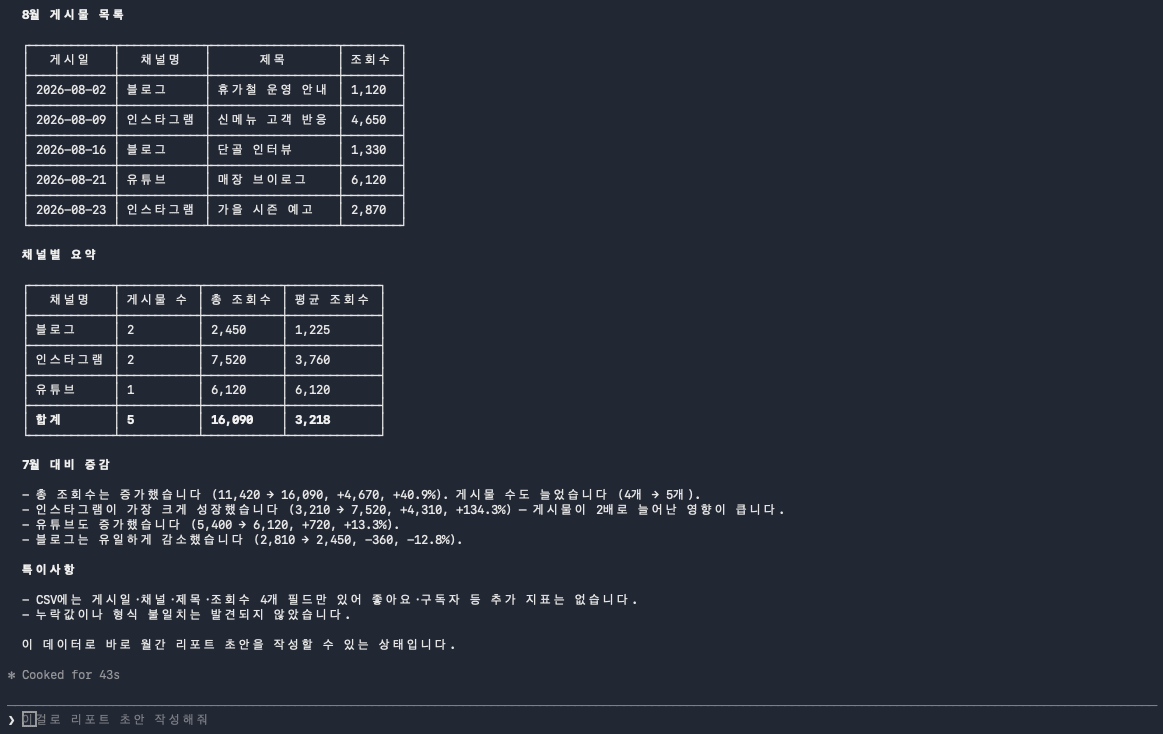
All that comes back to the main conversation is this tidy set of tables and a summary. How many times the subagent read the CSVs never lands here.
.claude/agents/report-researcher.md with the content above and save it. In a Claude Code session, ask something like "gather this month's material with the report-researcher subagent" and confirm delegation actually happens. If the subagent's name shows up in the progress indicator, and once it's done the conversation shows only the finished table and summary, not a list of files it checked, you've completed this lesson.How is this different from a skill
Lesson 1 flagged the English autocomplete query "subagents vs skills" as a sign that skills and subagents get confused with each other. Time to untangle it properly. One sentence: a skill is a written procedure for what to do and how; a subagent is a worker that actually takes that procedure, including it, and carries out the work.
| Skill | Subagent | |
|---|---|---|
| Context | Loads straight into the main conversation's context when called | Runs in its own separate context |
| Result | The whole process stays visible in the conversation | The process disappears; only a summary comes back |
| Tool permissions | Uses the main conversation's permissions with no separate restriction | tools can restrict which tools it's allowed to use |
The two overlap too. Add a skills field to a subagent's frontmatter, and that subagent starts up having already read the content of a specific skill. Say report-researcher needs to reference the same table format every time; write skills: [monthly-report-draft] and it has that procedure in hand from the start. If a skill is the document describing how to do the work, a subagent is the person who takes that document, actually leaves the room, and comes back having done it.
When not to use a subagent: short or interactive tasks
The official docs narrow the case for using a subagent down to one condition: when the side work would fill the main conversation with search results, logs, or file contents you won't reference again. Read that backward and you get the cases where you shouldn't.
Attaching a subagent to a quick check is actually a net loss. Opening a new context, finishing the task, and summarizing the result back is itself time spent on the round trip. If all you need is to open one file and check one value, doing it yourself is faster. Information you'll need to keep referencing shouldn't go to a subagent either. All a subagent hands back is a summarized result, so if you'll need to look back at the file contents it skimmed through partway, don't split the context off in the first place. The same goes for anything where you need to watch the results live and adjust your next instruction on the fly. Once you delegate to a subagent, it's hard to step in until the result comes back.
Boil it down to one question: will you need to look back at the intermediate process once this is done, or is a summarized result enough? If the latter, splitting it off to a subagent is fine. If the former, don't split it off in the first place. What report-researcher hands back, a table, is by itself everything the draft needs, so it falls into the latter case. But if the job had required checking, file by file, exactly where each number came from, it wouldn't have gone to a subagent at all.
There's parallel work bigger than a subagent in the official docs too: agent views, for scattering multiple sessions and checking back later; agent teams, where multiple agents collaborate; and dynamic workflows, for orchestrating large jobs by script. These lean toward large-scale orchestration and developer territory, though, so this track doesn't cover them. At this stage, cleanly splitting off one piece of side work is all you need.
The moment a subagent starts to feel necessary arrives differently for different people. Some get there because sitting idle while one skill runs starts to feel like wasted time. Some get there because research results fill up the conversation and crowd out the context for the work they actually meant to do. Some get there because the skills built up in an earlier lesson multiplied until coordinating the order between them got unwieldy. For me it was the first one. Running skills one after another kept generating dead time waiting, so I moved to delegating data-gathering and research to an agent that only does that, and kept a separate writing agent and a separate fact-checking agent. Whichever route gets you here, you land in the same place. Split off the side work, and the main conversation gets lighter while the waiting starts overlapping instead of stacking up.
- A subagent runs with its own context, its own tool permissions, and an independent system prompt, and hands back only a summarized result to the main conversation
- Claude Code already ships with built-in subagents like Explore, Plan, and general-purpose. The
claude agentscommand isn't one of them either, it manages background sessions, a separate feature despite the similar name - Keep files in
.claude/agents/(project) or~/.claude/agents/(personal);nameanddescriptionare effectively required - A skill is a written procedure; a subagent is the worker that takes that procedure into a separate context and actually does the work. The
skillsfield can hand a subagent a skill in advance - Quick checks, information you'll need to keep referencing, and anything you need to watch live are all better done yourself than handed to a subagent
Frequently asked questions
How do I create a Claude Code subagent?
The easiest way is to describe the subagent you want, including where to save it, and ask Claude to create it for you. You can also write the markdown file with YAML frontmatter directly, under .claude/agents/ for a project or ~/.claude/agents/ for yourself. name and description alone meet the minimum requirement, and tools and model let you set tool permissions and which model to use. As of v2.1.198, the /agents command no longer opens an interactive wizard, it just prints where the files live.
What's the difference between a subagent and a skill?
A skill is a written procedure for what to do and how, and calling it loads that content straight into the main conversation's context. A subagent is a worker that takes that procedure, including it, and actually carries out the work in its own separate context, where the process disappears and only a summarized result comes back to the conversation. A subagent's skills field in frontmatter can also pull in a skill's content ahead of time and combine the two.
Is the claude agents command for managing subagents?
No. The name looks similar, but claude agents is a separate feature for managing background sessions that keep running even after you close the terminal window, because a separate supervisor process holds onto them instead. If your computer falls asleep, the session pauses along with it and resumes on wake, and running while your computer is completely off belongs to cloud routines instead. The subagent files this lesson covers live in .claude/agents/, and you check or create them through the /agents command or by asking Claude directly.
When should I not use a subagent?
Skip it if the side work isn't big enough to fill the main conversation with search results, logs, or file contents you won't reference again. Opening a new context for one quick check is a net loss, and so is anything where you'll need to look back at intermediate content that disappears behind the summarized result, or anything you need to watch live and adjust your next instruction for. Those are better done yourself than handed to a subagent.
How do I decide which tools a subagent can use?
List the tool names you want to allow under the tools field in frontmatter, and that becomes an allowlist; omit it and the subagent inherits whatever tools the main conversation has access to. To restrict it to read-only, list just the read-and-search tools, like Read, Grep, Glob. You can also do the opposite and exclude specific tools using the disallowedTools field.
Sources (3)Expand to see all sources
- Claude Docs, "Creating custom subagents": subagent definition (separate context, system prompt, tool access, independent permissions), built-in subagents (Explore, Plan, general-purpose), full table of supported frontmatter fields (name, description, tools, model, skills, etc.), .claude/agents/ vs ~/.claude/agents/ scope, the note that as of v2.1.198 /agents prints guidance instead of opening the wizard, and the explicit note that claude agents is a separate feature despite the similar name (checked 2026-08-22)
- Claude Docs, "Running agents in parallel": comparison table of subagents, agent views, agent teams, and dynamic workflows; the condition for using a subagent ("when side work would flood the main conversation with search results, logs, or file contents you won't reference again") (checked 2026-08-22)
- Verified locally (the link points to the official doc it was checked against): Local check of claude agents --help and claude --version output: confirmed claude agents reads "Manage background agents," a separate feature from subagents; Claude Code version 2.1.239 (checked 2026-08-22)