Aside Browser Review: Windows Support, Pricing, and Security
Aside is an agent browser: on websites you are already logged into, AI searches, clicks, and types in your place. It does not stop at summarizing a page or answering a question. It moves across multiple pages to carry a piece of web work through to the end.
- Agent browser
A browser that does not stop at showing you a page. It breaks down what you ask for into several steps and carries them out directly. An agent, in this sense, is an AI that splits your instructions into a sequence of steps and keeps moving from one to the next.
Whether you actually need this comes down less to "can AI see the web" and more to "can I hand off the repetitive, logged-in work I keep doing myself."
Connecting a service is sometimes not enough to put AI to work on a website. If there is no API, or it only covers a narrow slice, reading the data you need or changing a setting on screen stays out of reach. MCP, the standard that connects AI to outside tools, does not reach past the specific features it was hooked up to either. What is left over is work only a human browsing directly can do: log in, navigate several menus, check things, and type things in. Checking ticket, concert, or travel listings through to purchase, or reading and organizing data across several ad channels, both fall into that gap.
That said, the last, irreversible move, paying, posting, sending, still needs a direct check.
Pricing and supported platforms can change, so check the official Aside site and its help docs for the latest before you install it.
Aside browser: working on sites you're already logged into
Aside is a separate browser built on Chromium. It has an address bar and tabs like any other browser, and next to the address bar sits Ask AI. Type what you want done there, and AI opens the site, searches, clicks, types, and moves on to the next screen.
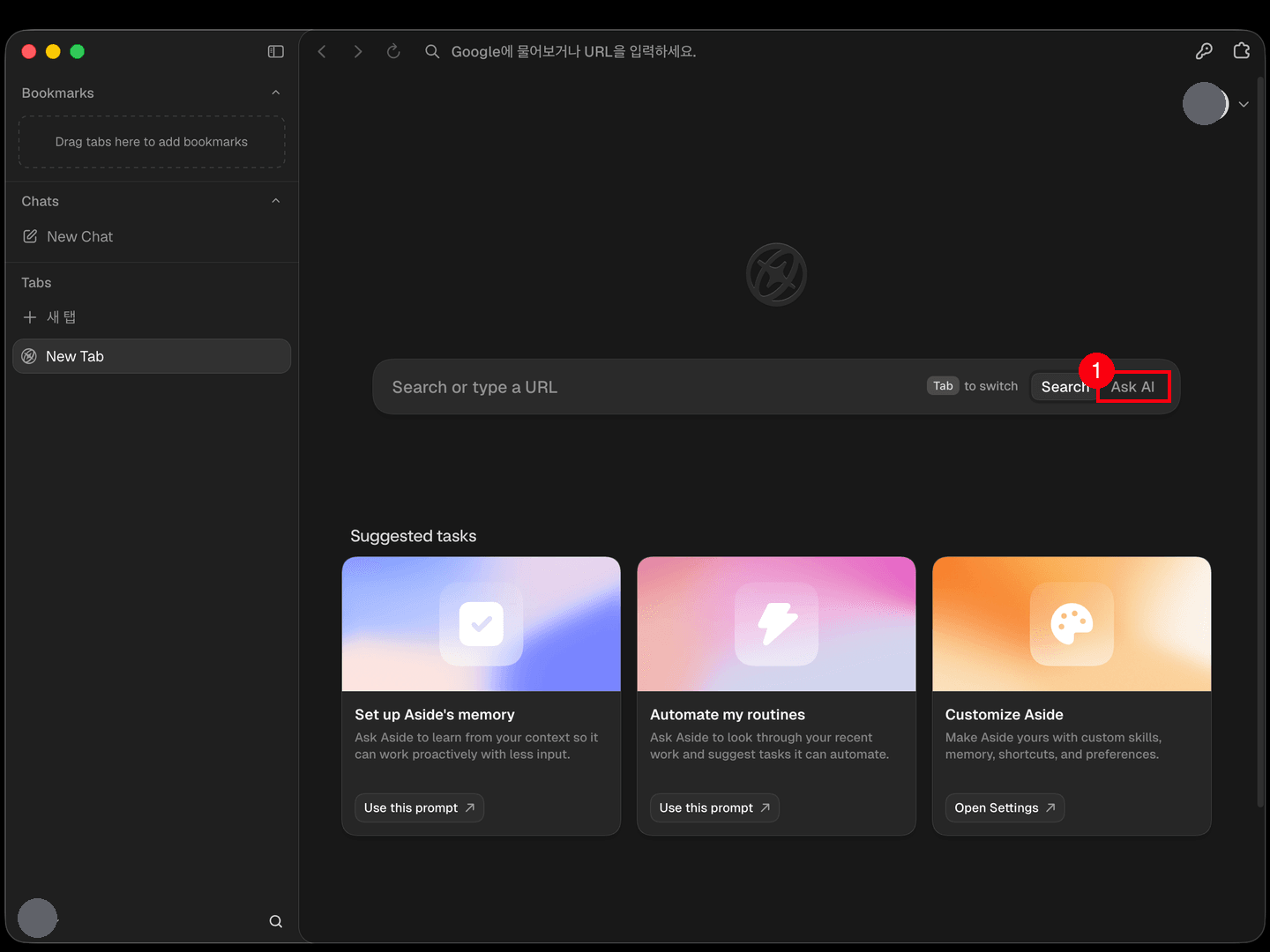
Where a typical AI sidebar focuses on summarizing the current page or answering a question, Aside focuses on carrying an actual task through on a website. Aside's own site describes it the same way: a browser for working across email, dashboards, and internal tools on sites you are already logged into.
The clearest way to picture what Aside does is to imagine typing a real task into Ask AI as one sentence. Something like this.
"Search three stores I'm logged into for a black linen shirt, compare the price, shipping cost, expected delivery date, and exchange terms, then start the order for whichever one comes out cheapest overall. Stop right before payment, and put the candidates you compared and your final pick into a table."
Aside chains together searching, comparing, choosing, filling in details, and moving through an order. You can let it go all the way to payment, or tell it to stop right before and check with you. How far you hand it off is your call. For anything hard to undo, I would check it yourself.
What Aside is for: repetitive, multi-step web work
The point of Aside is not doing one click for you. It is carrying through a chain of steps you used to do yourself. What matters is not which service you are on, but whether, after logging in, you need to read a value on one screen and use it as input on the next.
| Type of work | Steps it chains through in the browser |
|---|---|
| Buying, booking | Search, compare terms, fill in details, checkout or confirm booking |
| Research, monitoring | Visit multiple sites, gather material, compare by criteria, compile results |
| Ads, ecommerce ops | Log into admin, check metrics, enter settings or product info, review changes |
| Pulling operational data | Check a dashboard, download a file, organize the values, enter them into an internal system |
For personal use, you can search out tickets, concerts, or travel deals where terms keep changing, compare them, and carry the process through to booking or purchase. It gathers information scattered across screens, like price, shipping cost, and arrival date, then works out which option fits best.
For work, the target is any service with no API, or one that only supports read access, leaving the rest to happen on screen. Ad platforms, ecommerce admin panels, CRM tools, and partner portals fall into this category: screens where AI has to log in itself, read metrics, download files, and find and fill in settings. The real value is being free to do something else while it works through several screens in sequence. It is worth starting with reading and organizing tasks, and keeping an approval step on anything that changes a setting.
Supported platforms: Mac and Windows, no mobile
On a Mac you need macOS 15 or later, and an older OS version puts you outside official support. Windows users waited a long time, and the Windows build shipped on September 14, 2026. The minimum supported Windows version is not documented yet, though the changelog lists improvements targeting Windows 10, so it appears to run there. Mobile is still nothing: there is no iPhone or Android app.
Being Chromium-based, Aside looks a lot like Chrome, but it is still one more browser taking up memory and storage. Since it is still an early product, I would not swap out your main browser right away. Pick one repetitive task and try it out first.
I covered installation, connecting a model, and permission setup separately in Setting Up Aside Browser. This piece focuses less on how to install it and more on what you can hand off and under what conditions you should.
Why I looked into Aside: closing the gaps where AI work stalls
I did not look into Aside because I wanted to try out another browser. I wanted to hand off the process of going to a specific URL, checking a logged-in screen, adjusting search terms and filters, reading the results, and clicking whatever button came next. I wanted to be doing something else while that happened.
Playwright MCP: stopped at the login screen
The first thing I hooked up was a browser automation tool. Playwright MCP is a setup that lets AI call browser automation functions, opening a browser through code and navigating, clicking, typing, and downloading files, right in the middle of a conversation. MCP, or Model Context Protocol, is the standard that connects AI tools like Claude Code to outside functions.
- Playwright MCP
A setup that exposes Playwright's browser automation as an MCP server so AI can call it directly. Which browser profile and login state it uses depends on how it is set up.
In the Playwright MCP setup I used, it could open a specific URL, but the login state did not carry over, so the work stopped at any screen that required signing in. The point here is not that Playwright always opens a fresh browser or profile. It is that in the setup I was running, it could not get past a login screen.
That does not make Playwright a bad tool. It is a solid choice for repeatedly reading public pages that need no login, or running a fixed set of web tests. What I was trying to do needed a way to carry a login state forward first.
Claude in Chrome: blocked on certain sites even after logging in
Next I tried an extension you install in Chrome: Claude in Chrome, which lets AI read and operate a Chrome tab you are already logged into. If it could use my existing login state as-is, I figured it might sidestep the problem I had just run into.
- Claude in Chrome
A browser extension installed in Chrome. Instead of opening a new browser, it lets AI read, click, and type in the Chrome tabs you already have open.
This time the login state did carry over. But site-specific safety restrictions showed up instead. Here is what I found when I checked in August 2026.
| Site checked | Result |
|---|---|
| Naver (Korea's biggest search portal, roughly the local equivalent of Google) | AI blocked from acting on it |
| Coupang (a major Korean ecommerce platform, roughly the local equivalent of Amazon) | AI blocked from acting on it |
| Tistory (a Korean blogging platform) | Worked normally |
Naver and Coupang both returned a safety restriction message, while Tistory opened normally. Nothing was wrong with opening these sites in Chrome myself. What was restricted was the path Claude used to act on them through the extension.
Here is the message that shows up when it is blocked. It was the same when I checked again on August 24, 2026.
This site is not allowed due to safety restrictions.
This does not mean the tool is broken. It means that specific site has been flagged and blocked. Opening Naver in Chrome yourself works exactly as you would expect. What is blocked is AI acting on that site through the extension.
Why I picked Aside: carrying logged-in work through
Aside is not one more feature bolted onto Chrome. It is a separate Chromium browser with an agent built in. Its whole structure is built around handling logged-in websites directly on screen, which made it a plausible way to close the two stalls I had just run into.
Installing Aside does not guarantee every site works, of course. You still have to check site-specific restrictions, login methods, and captchas on a case-by-case basis. I was not looking for a promise that "anything works." I wanted to see whether a different structure could actually solve the problem of AI stalling in front of a login screen.
| Approach | Login state | What I found | Good fit for |
|---|---|---|---|
| Playwright MCP | Did not carry over in the setup I used | Stopped at any screen requiring login | Public pages, fixed web tests |
| Claude in Chrome | Uses your existing Chrome login | Blocked from acting on Naver and Coupang | Work on sites with no restriction |
| Aside | Built to work on sites you are logged into | Still needs checking site by site | Repetitive work behind a login |
Pricing: connect what you already pay for, or subscribe to Aside
There are two ways to use Aside: connect an AI subscription you already pay for, or use the model Aside provides under its Free, Pro, or Max plan.
| Approach | What you pay Aside | Model cost |
|---|---|---|
| Connect an existing AI subscription | Nothing extra if you stay on Free | You keep paying your existing Claude or ChatGPT subscription |
| Use an Aside plan | Free, Pro, or Max | Covered by the Aside plan |
| Connect an API key | Nothing extra beyond the API key itself | The API provider bills you by usage |
Connecting a model: existing subscription or API key
If you already have Claude Pro or Max, or ChatGPT Plus or Pro, you can connect it under Aside's Settings > Models > Providers. Aside will not make your existing subscription fee go away, but you do not need to add a separate paid Aside plan just to use the browser.
If you have no AI subscription, you can pick Aside's built-in model instead. Connecting an API key directly is also an option, in which case whichever provider you connect (Anthropic, OpenAI, Google, and so on) bills you by usage. You can see what the actual connection screen looks like in the model-connection step of Setting Up Aside Browser.
Aside's plans: Free, Pro, Max
Here is the pricing table as of August 23, 2026. Prices and included features can change, so double-check the official pricing page before you pay for anything.
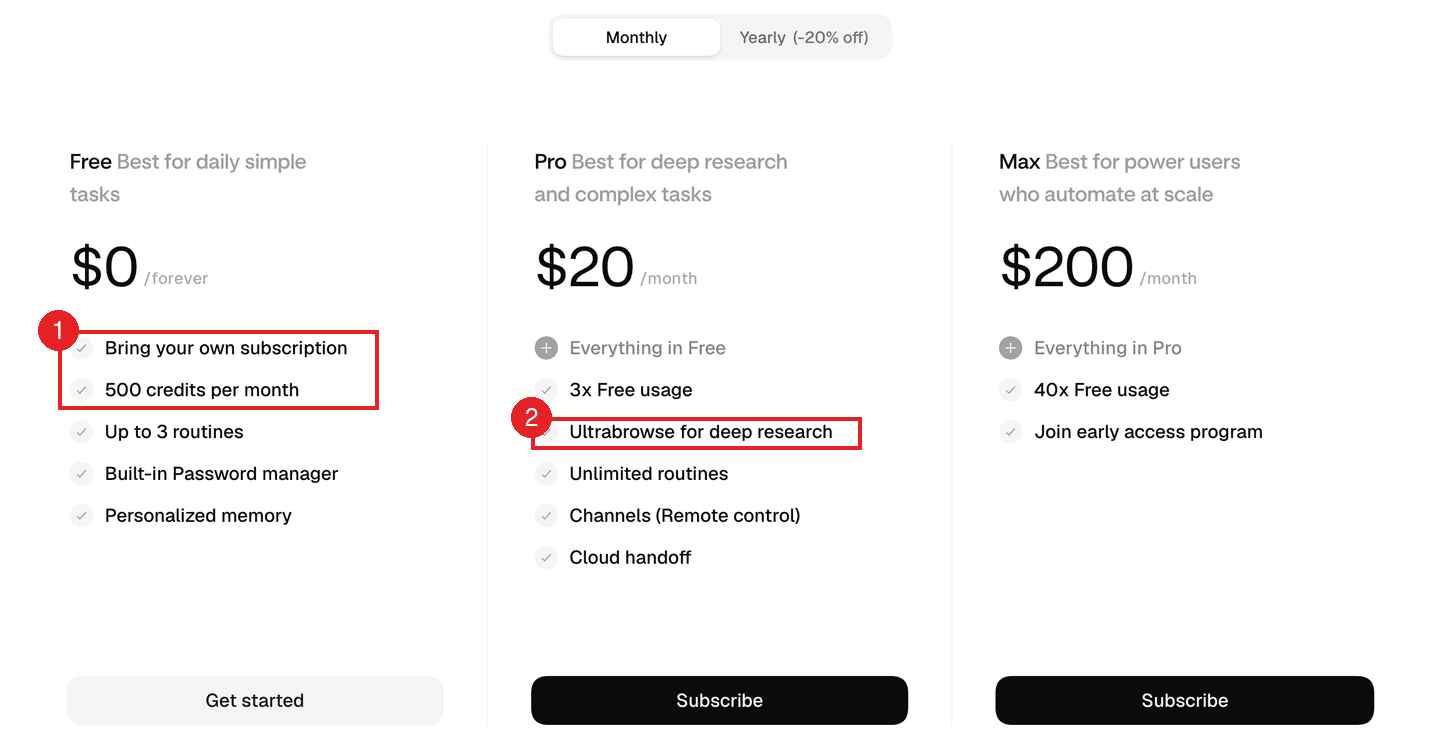
| Tier | Monthly price | What's included |
|---|---|---|
| Free | $0 | 500 monthly credits, 3 Routines, password manager, Memory |
| Pro | $20 | More credits than Free, Ultrabrowse, unlimited Routines |
| Max | $200 | Even more credits, early access to new features |
Starting out, connecting an existing AI subscription to the Free tier and testing one repetitive task is the better move. Look at Pro or Max once you are using Aside's own models heavily, or digging deep across many pages.
Security risk: it can pay and send mail as you
Aside's biggest strength is being able to work on websites you are already logged into. That is also exactly where its biggest risk comes from. If AI can read a page and act on your account, mistaking a sentence embedded in that page for your instruction means it can carry out a different action, still using your account.
An attack that hides text on a webpage where only AI will read it, tricking it into requesting a password or verification code, is called a prompt injection. Reported cases against browser AI include asking it to summarize a page and having that trigger it to pull a Gmail verification code, or attempt a payment with a saved card.
- Prompt injection
An attack that hides text in a webpage, email, or document to trick AI into treating it as the user's instruction, steering it into an action different from what it was actually asked to do.
In Anthropic's own measurement, the attack success rate was still 11.2% with defenses applied (23.6% without). Defenses lower the risk, they do not remove it. I have not found any independent security research specifically on Aside.
Permission settings: sandbox, file scope, tool approval
Here is what the default permissions look like on Aside's Agents settings screen.
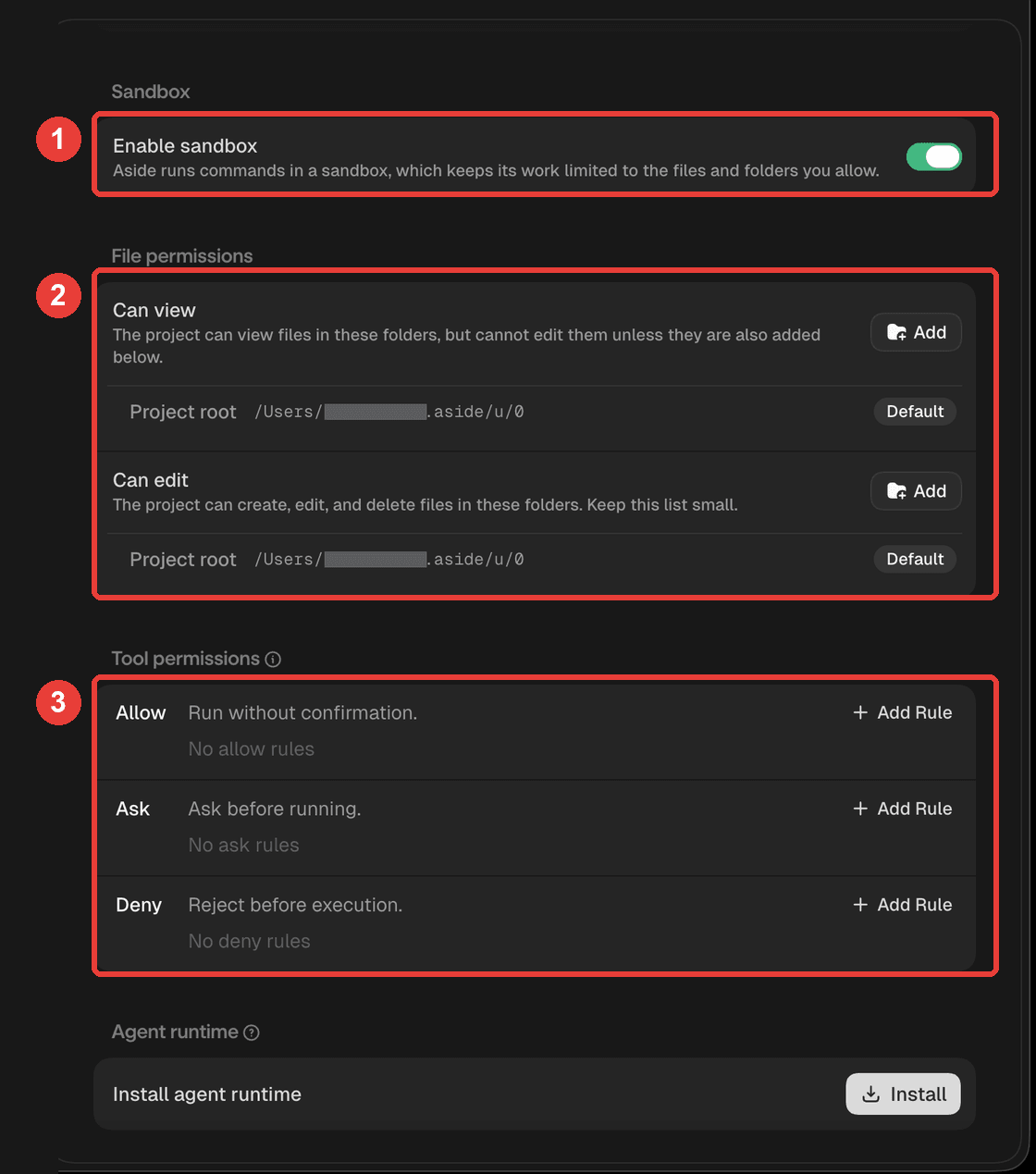
- Sandbox: limits the execution environment the agent can reach
- File permissions: sets which folders AI can read or change. The default is Aside's own working folder
- Tool permissions: sets tool execution scope as Allow, Ask, or Deny
The default setup does not leave your whole computer open. But widening what gets auto-approved because a task is not working smoothly widens the risk right along with it. Keep your personal browsing separate from your agent environment, and I would avoid using it on banking, tax, or medical sites altogether.
Where your data goes: local by default, sent to a model when needed
Aside's official site leans on "Local by default," the idea that your work and data stay on your machine. But its privacy policy also states that, depending on the AI task, information like your prompts, tool outputs, selected browser screens, screenshots, and files can be sent to the model provider.
So "local by default" should not be read as "nothing ever leaves your computer." You need to think through which sites you are opening, what material you are letting it read, and what the policy is at whichever model provider you connected. Keep the rule that anything hard to undo, paying, sending, posting, gets your direct approval as the last step.
Who this is for: buying, booking, research, and ops
Aside fits people who repeat logged-in web work and are willing to review the final action themselves. The deciding factor is the shape of the work, not your job title. If any of these sound like you, it is worth testing one task on the Free tier.
- Comparing prices and buying: hopping between stores, ticket sites, and travel booking sites to compare price and terms, then carrying it through to an order or booking
- Watching price or stock: repeatedly checking price, stock, or sale status on a specific item or seat, and moving to the next step once conditions are met
- Running ads or ecommerce: reading metrics across several ad channels or store admin panels, and checking or editing product, campaign, or budget info
- Pulling reports and operational data: logging into several dashboards, gathering numbers, downloading files, and rolling it all into one table or report
- Services with no API or a narrow one: where the connected integration only covers reading data, and selecting filters, downloading files, or changing settings has to happen directly in the browser
- Internal admin tools and partner portals: CRMs, booking systems, and partner sites with no dedicated integration, where you have to log in and move between several menus
- Content and support work: uploading material to a CMS and entering categories and tags, or reading through inquiries and logging them in the right screen
- Recurring research and monitoring: checking through logged-in communities or resource libraries in order, gathering only what's new, and summarizing it
On the other hand, I would not recommend it yet if you are on mobile, if you only need to read one or two public pages with no login involved, or if you are trying to automate accounts where a mistake is costly, like banking, tax, or medical. And if your current browser already handles the job fine, there is no real reason to switch.
The reason I picked Aside in the first place was to see whether it could actually close that stall.
If you decide to try it, Setting Up Aside Browser walks through download, connecting a model, and permission setup in order. For a first task, pick something reversible like reading and organizing, not buying or posting.
- Aside is an agent browser: AI searches, clicks, and types across websites you are already logged into.
- It fits work like buying tickets, booking travel, running ads, checking dashboards, and pulling data, anything that needs a login and repeated steps.
- Playwright MCP, in the setup I used, could not get past a login screen. Claude in Chrome had AI-operation blocked on some Korean sites.
- A Mac needs macOS 15 or later, and Windows is covered by the build released on September 14, 2026. There is no mobile app.
- You can connect an existing Claude or ChatGPT subscription, or use Aside's own Free, Pro, or Max plan.
- Start on Free, and check anything irreversible, payment, sending, posting, yourself before it happens.
- Since it acts on your login state and reads whatever is on the page, weigh prompt injection and the chance your data gets sent onward.
Frequently asked questions
What is Aside browser?
It is an agent browser that carries out search, clicks, typing, and page navigation on websites you are already logged into. The focus is less on summarizing the page in front of you and more on handing off a multi-step piece of web work.
What can I actually have Aside do?
Things like checking tickets and travel listings, comparing products and filling in order details, reading ad-channel metrics, pulling data from dashboards, and downloading attachments, work that chains across several pages and input steps. For anything involving money, like payment or a confirmed booking, it is safer to check and approve it yourself.
What's the difference between Playwright MCP and Aside?
Playwright MCP is a setup that lets AI call browser automation functions; Aside is a Chromium-based browser with an agent built in. In the Playwright MCP setup I used, the login state did not carry over, so work stopped at any login screen. Aside is built specifically to work on websites you are already logged into.
Does Aside run on Windows?
Yes. The Windows build shipped on September 14, 2026, and the minimum supported Windows version is not documented yet. Before that it was Mac only.
Can I use it on my phone?
No iPhone or Android version exists. It is a desktop-only browser that runs on Mac and Windows.
Do I have to pay to use Aside?
There is a Free tier at $0 a month, with a limit of 500 monthly credits and 3 Routines. Connect a Claude or ChatGPT subscription and you keep paying what you already pay, without touching your Aside credits. Connect an API key instead and that provider bills you for usage.
Is Aside safe?
There is structural risk in letting AI act through your logged-in account. The default setup includes sandboxing and file-scope limits, but the risk remains that AI follows a hidden instruction on a webpage, or that widening auto-approval broadens what it can do. Be especially careful on banking, tax, and medical sites, and with anything involving payment, sending, or posting.
Sources (8)Expand to see all sources
- Aside official site, browser for working on websites you're logged into, and core features (checked August 24, 2026)
- Aside official docs, connecting AI providers, existing subscriptions, and API keys (checked August 24, 2026)
- Aside official docs, Free, Pro, and Max plans and credits (checked August 24, 2026)
- Aside official privacy policy, information that can be processed during AI tasks (checked August 24, 2026)
- Aside official docs, agent permission settings (checked August 24, 2026)
- Anthropic, Claude in Chrome and measured prompt injection rates
- Playwright official docs, browser automation features
- Model Context Protocol official docs, MCP overview