Claude Pricing: Pro vs. Max, and How to Choose
AI subscriptions generally split into two kinds: plans an individual pays for directly, and plans where an admin manages everyone's access from one place. Claude follows the same split, with Free, Pro, and Max for individuals, and Team and Enterprise for organizations.
The trouble starts once you're using the free tier and open the billing page for a paid feature, and the options suddenly multiply. What are the 5x and 20x next to Max multiples of? Does a solo founder need Team? Which plan do you actually need to start using Claude Code or Cowork? None of that is obvious from the pricing screen alone. And going strictly by price, Pro at $20/month, Team Standard at $25/month, and Max 5x at $100/month line up in that order, which can make Team look like the next tier up from Pro.
This piece starts by drawing a clear line between individual and organization plans. From there it walks through when Free stops being enough and Pro becomes worth it, when to move up from Pro to Max, and what actually separates Team from Enterprise. It closes with a situation-by-situation recommendation and the refund policy, so you can settle on a plan today.
Start with whether you need an admin
What splits individual plans from organization plans isn't headcount. Even a five-person company can have all five people paying for Pro individually. The real dividing line is whether one person manages everyone's access and billing from a single place. If you need that, look at Team or Enterprise. If not, an individual plan is enough.
The individual plans
Individual plans follow a ladder: start on Free, move up to Pro once you need a paid feature, then look at Max once Pro's usage limit runs out. Within Max, you choose between 5x and 20x based on how much usage you actually need.
The figures below come from the official pricing page. I first noted them in August 2026 and checked again in September, and the numbers had not moved. Pricing and terms can change, so check that same page once more right before you pay.
| Plan | Confirmed price | When to pick it |
|---|---|---|
| Free | $0 | Start chatting with Claude at no cost |
| Pro | $20/mo or $200/yr | Your starting point for paid features |
| Max 5x | $100/mo | 5x Pro's usage |
| Max 20x | $200/mo | 20x Pro's usage |
Why the checkout screen shows a different number
The prices above are pre-tax. If you open the pricing page with a Korean billing address, the numbers look different.
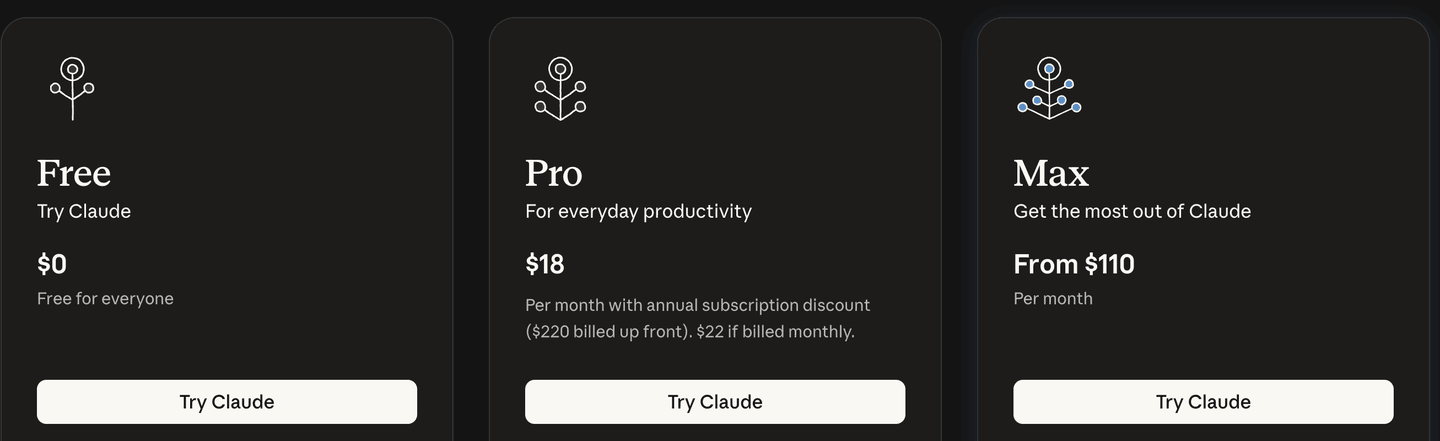
It looks like a price hike, but it isn't. It's the base price plus 10% Korean VAT. The page itself spells this out further down: "Prices include 10% VAT." Add 10% to the pre-tax $20 and you get $22; $100 becomes $110; the annual $200 becomes $220. The $18 shown next to annual billing is just $220 divided across twelve months. Even opened from Korea, the currency stays in US dollars, and no Korean won amount appears anywhere.
That said, this is only the displayed price. Your actual invoice can differ. On an account with a Korean business registration number on file, the invoice showed the pre-tax amount with no tax line at all. Entering that number is what removes the VAT, though that process is specific to Korean business accounts and is covered in a Korean-language guide only. If you're paying as an individual, or from outside Korea, the amount shown on the pricing page is the number to plan around; your own country may add a different tax on top, or none at all.
None of this guarantees the underlying prices stay fixed going forward, either. The same page states that "pricing and plans are subject to change at Anthropic's discretion," so it's worth reconfirming whatever number is on screen right before you pay.
So which of these actually fits you? Individual plans move up one step at a time, Free to Pro to Max, so the answer comes from looking at where you're currently running short.
Free vs. Pro: when paid becomes worth it
If you're just chatting with Claude to polish writing or organize material, Free covers that fine. The moment you need Claude Code or Cowork is the moment to look at Pro. Needing those two features doesn't mean you have to jump straight to Max.
Pro runs $20/month or $200/year. Which billing cycle to pick is covered in the last section.
Pro vs. Max: when usage runs short
Pro is the entry-level paid plan for using paid features like Claude Code. Max doesn't unlock anything new. It just multiplies the usage you get on top of Pro's baseline. Try out the paid features on Pro first, and move up to Max once usage limits keep interrupting work that actually matters.
You can start on Pro and upgrade to Max later if it's not enough. Per the official guide, the upgrade takes effect immediately and is prorated for the rest of your billing period. Whatever unused portion of your Pro payment is left gets applied as a credit against the Max charge.
There are two exceptions. If you're upgrading from annual Pro and your remaining balance is larger than the Max price, the difference stays as account credit toward your next bill. If you paid through Google Play, the new plan is charged in full and your unused portion is converted into extra days of access instead. Since pricing and billing mechanics can change, confirm the final charge on the checkout screen before you proceed.
Max 5x vs. 20x: both multiples of Pro
The numbers in Max 5x and Max 20x are both multiples of Pro's usage, not of each other. Max 5x means 5x Pro's usage; Max 20x means 20x Pro's usage. Max 20x is not 20 times bigger than Max 5x, and neither tier changes response quality or speed.
The multiplier alone won't tell you how many questions per day or how many hours of work you'll actually get. If Pro's limit keeps cutting off your work, compare Max 5x; if the same problem keeps happening on Max 5x, look at Max 20x.
Dividing price by usage reveals what makes Max 20x different. Pro and Max 5x both work out to $20 per 1x of usage, but Max 20x comes out to just $10. For anyone who genuinely needs that much usage, 20x is half the price per unit. I cover where to check your usage limit and how it resets in a separate piece.
That covers the plans built for working solo. If you're moving off Free to try Claude Code or Cowork for the first time, start with Pro monthly and look at Max only once your work keeps getting interrupted. The organization plans below only matter once an admin needs to manage everyone's access and billing. The situation-by-situation summary is in a table at the end.
The organization plans
Organization plans come in two: Team and Enterprise. Look at Team once an admin needs to manage everyone's access and cost from one place, and at Enterprise once you need tighter security and compliance controls. Within Team, each member gets a Standard or Premium seat depending on how much usage they need.
- Seat
A seat is the unit that counts one person's access to a plan. It isn't something the whole organization shares. Each member is assigned their own seat.
Team: an admin manages the seats
Per the official Team plan guide, Team requires a minimum of two members and supports up to 150 seats. When someone joins, an admin assigns their seat and role; when they leave, the admin can revoke access and hand that seat to someone else. Where five people on individual plans means checking billing and cancellation across five separate accounts, Team lets one admin handle all of it in a single place.
Per the Team getting-started guide, someone already on an individual plan can still create a Team. Your existing individual account stays intact, and you can optionally move chats, projects, files, and memory into the Team workspace. Content moved over that way can't be moved back to the individual account, though.
Here's what changes item by item once you add an admin, based on the official Team plan guide as of August 2026.
| Comparison | Individual plan, Pro | Team |
|---|---|---|
| Usage per session | Pro's 1x | Standard 1.25x, Premium 6.25x |
| Login and domain | Managed per account | SSO, Domain Capture |
| Onboarding and permissions | Everyone signs up and self-manages | JIT provisioning, role-based permissions |
| Spend control | Each person sees only their own cost | Org-wide and per-member spend limits |
| Usage credits | Pay after use | Org can prepay in bulk |
| Monthly price | Pro at $20/mo | Standard $25/seat/mo, Premium $125/seat/mo |
SSO lets employees log in with their company account. Domain Capture pulls any account created with the company's email domain under organization management, and JIT provisioning auto-creates an account the first time an employee logs in. Role-based permissions split what admins can change from what regular members can.
Standard vs. Premium seats
Standard and Premium differ in usage, not in which features you get. Per the Team seat management guide, Standard includes the core features plus Claude Code, at 1.25x Pro's usage per session. Premium includes everything in Standard, at 6.25x Pro's usage per session.
| Seat type | Usage per session | Includes | Monthly | Annual (monthly equivalent) |
|---|---|---|---|---|
| Standard | 1.25x Pro | Core features, Claude Code | $25/seat/mo | $20/seat/mo |
| Premium | 6.25x Pro | Everything in Standard | $125/seat/mo | $100/seat/mo |
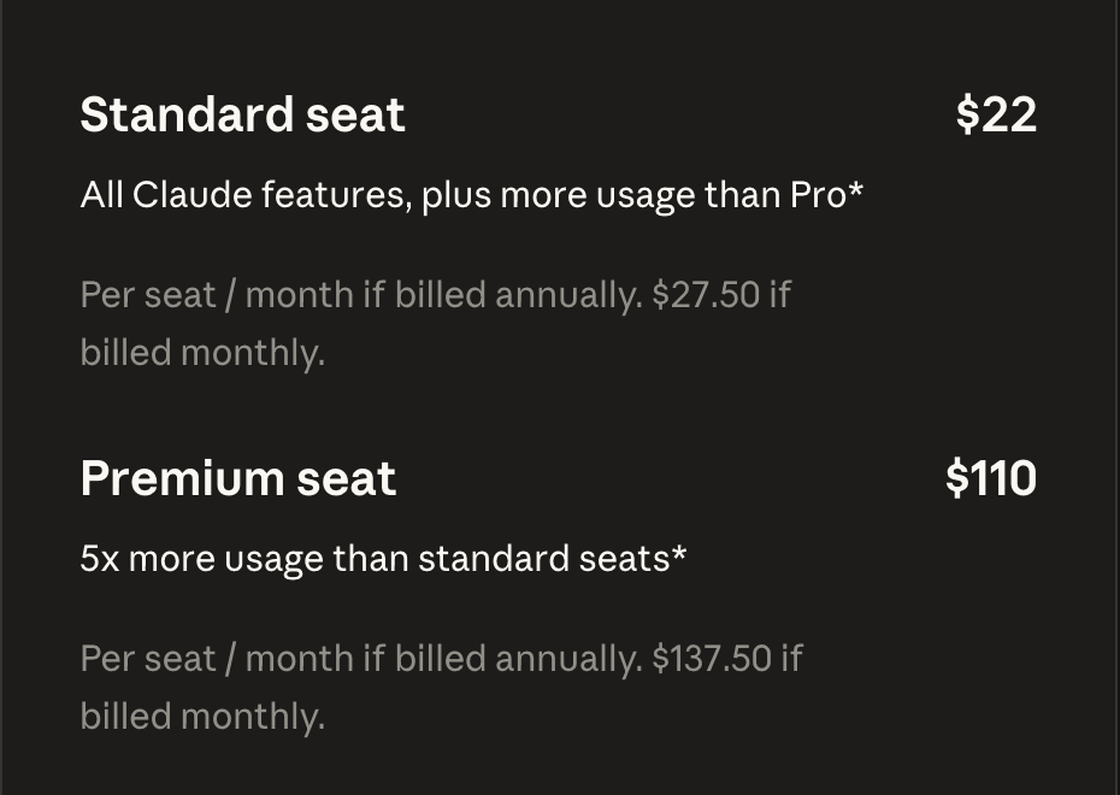
The numbers on screen differ from the table above for the same reason as before: with a Korean billing address, 10% VAT is added on top, so Standard monthly shows $27.50 instead of $25, and Premium monthly shows $137.50 instead of $125.
Team Premium's 6.25x usage per session beats Max 5x's 5x. That's not a reason to pick Team just to get more usage for yourself, though. Divide the $125 seat price by 6.25x and you land back at $20 per 1x of usage, the same rate as Pro. On usage alone, it's neither a better nor a worse deal. What decides it is whether you actually need the management features.
Prices are as of August 2026 for US customers, before tax. You can mix seat types. Assign Premium to members who need heavier usage and keep everyone else on Standard. Total org cost is each seat type's count multiplied by its price, then summed; the final regional amount should be confirmed on the checkout screen.
Enterprise: security, compliance, and usage-based cost
Enterprise is for organizations that need advanced security and compliance controls, or that have outgrown Team's 150-seat cap. Per the official Enterprise guide, the current usage-based version of Enterprise covers only access rights in the seat fee, with actual usage billed separately at API rates. Existing contracts may work differently, so lay out your seat count and security requirements and get an official quote.
The bottom line, by situation
Here's the short version, by situation.
| Your situation | Plan to start with |
|---|---|
| Want to try chatting at no cost | Free |
| Want to try Claude Code or Cowork, not sure how much you'll use | Pro monthly |
| Pro's limit keeps interrupting work that matters | Max 5x, then Max 20x if that's still not enough |
| At least 2 people, and an admin needs to manage access and billing centrally | Team |
| Need advanced security or compliance controls | Enterprise |
Even a solo founder should stay on an individual plan before hiring. Create a Team once a second person joins and central management becomes worth it. That's also when to decide on the irreversible content transfer.
If you're not sure how much you'll actually use, I'd start with Pro monthly. It's not too late to move to Max after your work starts getting interrupted for real.
Annual billing is worth it once your plan to keep using it is solid. Per the refund policy, payments generally aren't refunded, and per the cancellation policy, cancellation takes effect at the end of your current billing period. A 14-day cooling-off exception exists for the EEA and UK; it doesn't apply elsewhere, including the US or Korea, so check what consumer protection rules apply where you are. If you're not confident you'll stick with it, start monthly, and confirm the final price on the checkout screen.
- Claude's plans split individual from organization based on whether an admin needs to manage everyone's access and billing centrally, not headcount.
- As of August 2026, Free is $0, Pro is $20/month or $200/year, Max 5x is $100/month, and Max 20x is $200/month.
- Max 5x and Max 20x's multipliers are both based on Pro's usage, not response quality or speed.
- Multiple people can each run their own individual plan, but once you need SSO, role-based permissions, or org- and member-level spend limits, look at Team.
- If you're not sure how much you'll use, start with Pro monthly and compare Max once work keeps getting interrupted for real.
- Payments generally aren't refunded, and cancellation takes effect at the end of the current billing period, so choose your billing cycle carefully.
Frequently asked questions
Did Claude's prices go up?
Not on the base price. If you open the pricing page with a Korean billing address, Pro shows $22/month and Max starts at $110. That's the pre-tax $20 and $100 with 10% Korean VAT added, and the page itself states 'Prices include 10% VAT.' That said, this is only the displayed price; your actual invoice can differ. On an account with a Korean business registration number on file, the invoice showed the pre-tax amount with no tax line. Check the on-screen price right before paying, and check your actual invoice after.
How do I tell Claude's individual plans apart from Team?
Even with several people at a company, everyone can run Free, Pro, or Max individually if they each pay for it themselves. Look at Team or Enterprise once an admin needs to assign and revoke seats as people join and leave, and manage everyone's permissions and billing centrally. Team requires a minimum of two people, but the real deciding factor is whether you need that admin role, not headcount.
What's the difference between Claude Pro and Max?
Pro is $20/month or $200/year, and it's the baseline Max's usage multiples are measured against. Max 5x is $100/month for 5x Pro's usage; Max 20x is $200/month for 20x Pro's usage. Neither multiplier affects response quality or speed.
Which paid plan should I start with?
If you need Claude Code or Cowork but don't know how much you'll use, I'd recommend starting with Pro monthly. Look at Max 5x once Pro's limit keeps interrupting your work, and compare Max 20x if the same problem keeps happening on Max 5x.
If I cancel annual billing, do I get a refund?
Payments generally aren't refunded, and cancellation takes effect at the end of your current billing period. A 14-day cooling-off exception applies in the EEA and UK; it doesn't apply elsewhere. Pro's annual plan is billed at $200, so confirm the billing terms and final price on the checkout screen.
If I upgrade from Pro to Max, do I only pay the difference?
Per the official guide, the upgrade takes effect immediately and is prorated for the rest of your billing period. The unused portion of what you already paid for Pro is credited against the Max charge. If you paid through Google Play, though, the new plan is charged in full and your unused portion becomes extra days of access instead. Confirm the final charge on the checkout screen.
Sources (9)Expand to see all sources
- Claude Pricing (checked 2026-08-28)
- Anthropic Help Center, Max plan pricing and usage multipliers (checked 2026-08-28)
- Anthropic Help Center, What is the Team plan? (checked 2026-08-28)
- Anthropic Help Center, Purchase and manage seats on Team plans (checked 2026-08-28)
- Anthropic Help Center, Get started with the Team plan (checked 2026-08-28)
- Anthropic Help Center, What is the Enterprise plan? (checked 2026-08-28)
- Anthropic Help Center, Request a refund for a paid Claude plan (checked 2026-08-28)
- Anthropic Help Center, How do I sign up for the Max plan (checked 2026-08-28)
- Anthropic Help Center, How do I cancel my paid Claude subscription (checked 2026-08-28)