Claude Code and Codex Together: How to Split the Work
A tool that reads, edits, and runs commands against your project's files on its own is called a coding agent. Claude Code and Codex are coding agents built by different companies. Plenty of posts compare the two and tell you which one wins, but if you already have access to both, that's the wrong question to ask.
More and more companies now give employees some form of AI. Some just cover a lightweight chat model. Others go further and cover a working tool like Claude Code or Codex. Some open up several tools at once. My company falls into the middle group: we started with a Business plan of ChatGPT for lightweight use, then added Claude Code for real work. Once Claude Code became my daily driver, ChatGPT got pushed down to occasional chat, and even that tapered off. If a subscription you're already paying for is sitting idle like that, the next question is how to put both to work at once.
This post is for anyone who already has both subscriptions and wants to get more out of them. It also works if you only have one and are considering a light subscription to the other just to try a joint workflow. I'll cover how to split one piece of work between Claude Code and Codex (built by OpenAI): the criteria for dividing roles, a setup I'm actually running, and the usage limits, context handoff, and file conflicts that come up once you combine them.
What "together" means: a workflow, not a connection
Running the two together doesn't mean wiring Codex into Claude Code, or having the two agents talk to each other automatically. It means splitting one piece of work and assigning the pieces to separate sessions, building a workflow out of them. One agent produces a result, the other reviews it for what's missing, and sometimes they work on non-overlapping files at the same time. It's the same way two people split a task between them.
The first instinct is to open two windows and paste the same request into both. That gets you two answers, not divided work. You end up comparing both results from scratch yourself, which adds more to check, not less.
What working together actually needs isn't a connector feature, it's a work boundary. Decide first what needs to be finished, which files are fair game, and who runs the final check. The agent's name comes after that.
| Role in one task | What it covers | What it hands to the next role |
|---|---|---|
| Plan | Set the goal, constraints, and definition of done | A short brief |
| Execute | Read files, produce the result | Changed files plus a record of judgment calls |
| Review | Compare the result against the original ask, run checks | What's missing, plus revision requests |
So who plans and who reviews? Nothing's fixed. I often have Claude Code plan and Codex review, then swap the roles and run it again to sharpen the result further. That way Codex catches what Claude missed, and Claude corrects what Codex got wrong. While Claude works, I can hand Codex something else entirely and run them in parallel. There's no single correct lineup, so it's worth experimenting with different combinations until one fits the work in front of you.
Odds are you already have both subscriptions
The idea of running both together didn't start from needing a new feature. It started from not wanting to waste money. That dormant subscription I mentioned in the intro, ChatGPT sitting there used only for chat while Claude Code did the real work, was going unused.
There was a reason for the neglect. The older Codex just wasn't worth reaching for. That changed once Sol, the newer model (a top-tier model from the GPT-5.6 generation), landed. Word that Codex had gotten good started spreading, and around the same time, tools like Orca (for directing several AI sessions from one screen) started showing up. Letting a paid tool sit idle felt wasteful, so I started experimenting with a setup that plays to each tool's strengths.
The key condition here is that both subscriptions already exist. If you only have one, there's no need to pay for a second tool just to try this. On the flip side, if your company or team already provides both, don't stop at comparing prices on paper. Hand one real task a supporting role from the other tool and see what happens.
I won't repeat exact pricing and usage limits here. They change often and vary by plan and organization settings. Current Codex coverage is in Codex pricing and the free tier, and Claude's side is in Claude pricing plans compared. Check the official pricing pages again before you commit to a paid plan or roll this out across a team.
What to split by
Basing the split on which product has the better reputation right now means your workflow wobbles every time a model or version changes. A more durable basis is the result, the files, and the context. Fix those three and it doesn't matter which tool picks up the work first, the next step still follows.
The maker role and the reviewer role
The easiest way to start is having one side make something and the other review it. Give the executing agent the goal, the scope of what it can change, and the definition of done. For the reviewing agent, don't just hand over the executor's own summary of what it did. Hand over the original brief and the changed files together.
There's a reason the review needs to be independent. If the side that wrote the summary says "everything in the brief is covered," the reviewer tends to check within that same frame. I've hit this directly. When I only passed the reviewer the executor's summary, it just confirmed the work looked fine and stopped there. Once I started passing the original brief alongside the changes, it started catching what was missing. Only a direct comparison between the original ask and the actual result catches gaps.
In this setup, the two tools never redo the same work. One side's output becomes the other's input. If review turns up nothing, the task ends. If something's missing, it goes back to the executor once.
Split files so they don't overlap
Running two tasks at once requires the files each one owns to not overlap. If one agent is writing the body of a post while another is polishing the same body, whichever saves last overwrites the earlier edit, or the merge conflicts outright. If the same file genuinely has to be touched by both, don't run them at the same time. Write first, then review, in sequence.
When several files are involved, splitting by path is the clearest way to do it. One side can own a content folder while the other only reads test results, for instance. Naming things "task A" and "task B" invites both tasks to end up editing the same config file. Writing out the actual file paths makes the boundary visible.
A separate branch or worktree (a Git feature that spreads one project across several working folders) can split the workspace too. But that mechanism doesn't decide file ownership for you. Two people editing the same file from two different folders still collide when it's time to merge.
Work that needs continuity vs. work that needs a fresh set of eyes
Decisions and exceptions hashed out over a long session accumulate inside that session. Follow-up edits that depend on that context are shorter if the same agent continues. The opposite holds when what's needed is a first-time reader's eye or an independent review, where a different agent's blank context helps.
Claude Code and Codex don't automatically share conversation history. Opening the same folder in both doesn't mean the second tool knows what the first agreed to earlier. Rules written into a file are visible to both, but reasoning and open questions that only ever existed in chat have to be handed over separately.
So rather than copying the whole context over, I write down just the decisions. Goal, what not to change, what's already confirmed, what's still open, and check results, kept short. Handing over an entire transcript just makes the new agent read through old trial and error before it can start.
A setup I've actually split this way
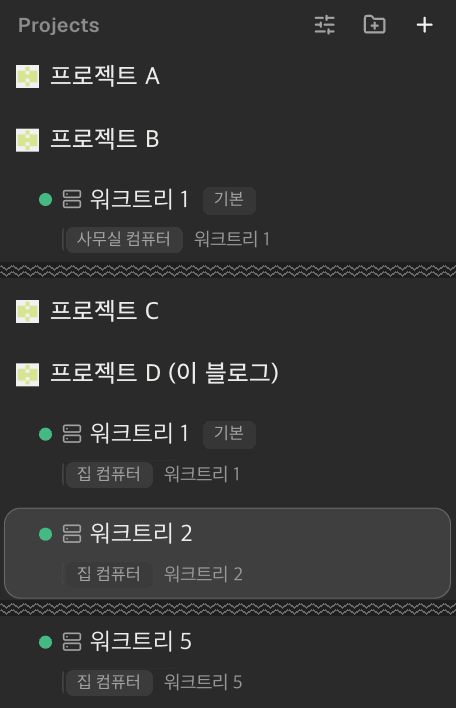
The starting point was clear. ChatGPT Business was sitting there used only for chat, so I decided to give Codex real work and find a way to run it alongside Claude Code. Watching multiple agents each own a separate task inside Orca also shaped how I approached this.
For writing work specifically, a split settled into place. Drafting goes to Codex, and fact-checking, review, and final line editing go to Claude Code. That splits the maker from the polisher. But I also flip it, having Codex review a plan Claude Code drafted. It's less about a fixed role per tool and more about deciding, per task, who builds and who checks.
When several sessions each own their own workspace, here's what the screen looks like.
Naming tools in a role table isn't enough on its own. Each role needs a condition for "done." "Draft the copy" doesn't tell the next tool where to pick up, but "write the draft to this file and leave the check results" does.
The first split you settle on isn't guaranteed to stay right either. Some tasks moved faster with the tool holding longer context, and some reviews turned out sharper from a fresh session. That difference has to come from what actually happens in the work, not from a product's marketing copy.
Once this setup settles in, the two agents aren't doing separate jobs, they're picking up where the other left off inside one piece of work. The goal isn't running planning, execution, and review all in parallel. It's splitting only what can safely run at the same time and handing off in sequence whatever depends on a prior result.
Take this a step further and you can even hand off the part where a person moves results between two windows. Putting several agent sessions on one screen and letting them exchange requests and replies is called orchestration, and that's what my Orca review covers. This post only goes as far as splitting work by hand. I'll go deeper into automating the handoff itself with orchestration in a future post.
Where it breaks: usage limits, context, and file conflicts
Opening a second tool feels like it should double your throughput, but in practice it stalls in three places: usage limits, separate context, and conflicts over the same file. Without drawing these boundaries up front, the second agent adds review work instead of saving time.
| Where it stalls | Why it happens | Rule to set first |
|---|---|---|
| Usage limits | Adding a session doesn't raise either subscription's usage limit | Don't start long tasks on both at once, check remaining limit first |
| Context split | One side's decisions and open questions aren't automatically known to the other | Pass a short handoff note |
| File conflicts | Two sessions can edit the same file at the same time | Split ownership by path, or work the same file in sequence |
OpenAI's official pricing documentation states that ChatGPT Work and Codex share usage. Work isn't a separate subscription from a plan like Business, it's the working screen bundled inside that plan. Claude Code's limits also shift depending on plan and how you use it. Having two subscriptions is not the same claim as unlimited use for either. Check the exact numbers and add-on usage policy on the official page on the day you need them.
Context doesn't merge on its own, so it's worth fixing a short handoff format ahead of time. Something like this is enough for a new session to pick up where the last one left off:
Goal:
Decisions made so far:
What not to change:
Files changed:
Checks run and what's still open:File conflicts do the quietest damage. As mentioned above, when a later save overwrites an earlier edit, no error is thrown, which makes the lost work hard to notice. The simplest, safest rule is having one side own final edits on a task while the other only reads and reviews.
File conflicts are exactly what I hit in practice. Two sessions each edited the same file, and one side's changes quietly vanished. After that, I set a rule to split path ownership before starting anything. A conflict that throws an error is far less scary than one that overwrites silently.
If you're only picking one, start here
If it were me, I'd start with whatever tool is already paid for and already has project access open. Finishing one full loop, writing the brief, editing files, running checks, confirming the result, with a single tool comes before adding a second subscription. Without a workflow you can complete alone, turning on two tools still leaves you with no basis for deciding where to split the work.
If you already have both, pick one as the primary and attach the other as reviewer. There's no need to force a 50/50 split. Whichever tool already has more project context tends to make sense as the executor, with the other one checking for missed requirements and check results.
| Your current situation | What to decide first |
|---|---|
| One tool already has project rules and history built up | Keep executing with that tool, assign the other reviewer duty |
| Your company only opened access to one tool | Finish one task fully with the available tool before comparing |
| You have both but barely touch one | Give the neglected one an easily-reversed role first, like reading and reviewing |
| You have neither | Don't start two subscriptions at once just to try this |
The point of running two together isn't adding more agents. It's having one side check the other's output and splitting only the files safe to touch at the same time, so the whole task finishes with less risk. My own rule is to start with what's already paid for and open a second tool only once a role for it actually shows up. If a subscription of yours is sitting idle, hand it review duty on one task you're already doing today. A feel for how to split work comes from that first split, not from reading about it.
- Running Claude Code and Codex together isn't about connecting two products, it's about assigning roles on the same piece of work.
- The easiest start is having one side make something and the other review it against the original brief and result, not just a summary.
- Working at the same time requires splitting files and paths. The same file needs sequential writing and review, not parallel edits.
- Conversation context between the two tools isn't shared automatically. Hand over a short note: goal, decisions, what not to touch, changed files, check results.
- If picking just one, start with whichever tool is already paid for and already has project access, and finish one task fully first.
Frequently asked questions
Do I need to actually connect Claude Code and Codex to each other?
No. Running them together doesn't require a dedicated connector feature. Split one piece of work and give each session a different role and file scope. When handing one side's result to the other, pass along the original goal, the changed files, and the check results together.
Which one should draft and which one should review?
Nothing's fixed. Starting with whichever tool has more current project context as the drafter, and the other reviewing with fresh eyes, is an easy way to begin. Swapping roles and running it again catches what each side missed the first time. Experiment and adjust the combination as you go.
Can two agents edit the same file at the same time?
Not recommended. A later save can overwrite earlier changes or conflict when merging. If you need to work in parallel, split by file or path, and for a shared file, have one side write first and the other review afterward in sequence.
If I have two subscriptions, does that mean double the usage limit?
You get access to two separate services, but each service has its own plan-based limit. Opening more sessions doesn't raise either subscription's limit. Pricing and usage policy change often, so check the official pricing page for current terms before starting work.
Can a nondeveloper run two coding agents together?
Yes, but it helps to finish one full loop with a single tool first. Once you have a routine of writing the goal, the scope of changes, and the definition of done, then reviewing the result, attaching a second tool as reviewer becomes an easy next step.
Sources (3)Expand to see all sources
- OpenAI official pricing documentation, Codex coverage across ChatGPT plans and shared usage (verified 2026-08-29)
- Claude Code official documentation, overview of reading codebases, editing files, and running commands (verified 2026-08-29)
- Claude Code official documentation, costs and usage management by plan and usage pattern (verified 2026-08-29)