How Far Does Free ChatGPT Go? Free Limits and Model Switching on Claude and Gemini
ChatGPT, Claude, and Gemini all offer a free plan. You can chat and upload files on all three, while ChatGPT and Gemini also let you generate images. What changes from service to service is the model answering you and how much of each feature you can use.
That difference usually becomes visible in the middle of a task. You may be polishing a report draft when a notice says, "You've reached your free limit." Something that worked yesterday suddenly stops, and the next search is often some version of "how far does free ChatGPT go?" You may want to switch models, but not even know where the menu is.
If the previous lesson helped AI remember your situation, now it is time to check which model is doing the work. This lesson covers the models and limits included in each free plan, then shows where to find each service's model menu. Prices and models change often, so check each company's official documentation too if you are reading this long after August 2026.
- Model
A model is the part of an AI service that actually generates your answer. ChatGPT, Claude, and Gemini are service names, like restaurants, while models are the chefs inside them, each with a different level of speed and skill. The difference between free and paid often comes down to which chef you are allowed to order from.
"ChatGPT" is not just one model
You may never have chosen a model, and that is normal. The default model is selected automatically, so many people use an AI service without realizing that a model menu exists.
Think of ChatGPT as a restaurant with several chefs in the kitchen. Some are fast and make ordinary dishes, while others take longer and handle harder requests. Free customers are routed to the default chef, while paid customers can name the chef they want. Claude and Gemini follow the same pattern.
That is why the question "How far can I use this for free?" includes another question: "Which model does the free plan give me?"
Free plans compared: models, limits, and features
| ChatGPT Free | Claude Free | Gemini Free | |
|---|---|---|---|
| Default model | GPT-5.6 Luna (rolling out; some accounts still see GPT-5.5 Instant) | Sonnet, Haiku | Gemini 3 Flash-Lite/Flash/Pro |
| Top-tier model | Not available (GPT-5.6 Sol is paid-only) | Not available (Fable/Opus are paid-only) | Pro is selectable (with a lower limit) |
| How limits work | Unlimited plain-text chat (with anti-abuse safeguards); separate limits for each tool, such as image generation | 5-hour session limits, exact numbers undisclosed (weekly limits apply to paid plans) | Refreshes every 5 hours plus a weekly limit, exact numbers undisclosed |
| File uploads | Yes (limited) | Yes | Yes (32,000-token limit) |
| Image generation | Yes (limited and slow) | Not available | Yes |
| Notable | Free tier shows ads in some countries | Context window is the same 200K as paid plans | Only free tier that opens its top-tier model (Pro) |
Usage limits are not published as neat daily numbers. If you have seen a blog claim that "free gets you 10 messages a day," that is not official information. ChatGPT says plain-text chat is unlimited, with anti-abuse safeguards, but it still does not disclose the numbers for tools such as image generation and file uploads.
Claude and Gemini also say only that their limits vary by usage. The official numbers you can confirm are mostly about context windows: ChatGPT Free has 27K tokens, Gemini Free has 32K, and Claude gives every plan, including Free, 200K.
Free accounts also get different model choices. ChatGPT and Claude keep their top-tier models behind paid plans, while Gemini includes Pro in its free list. The catch is that Gemini's limit is lower.
ChatGPT's free default model has changed to GPT-5.6 Luna. Both the official documentation and the pricing page list GPT-5.6 Luna as the free default model. The rollout is gradual, though, so some accounts still show GPT-5.5 Instant. The model name on your screen may differ from the one on another account.
Where to change the model
Now let us open the screen where you can check the model. We will look at Claude and ChatGPT in that order, then do a short Gemini check at the end. The goal is to see both where the menu lives and what a free account can actually switch to.
Claude: click the model name next to the send button
In Claude, the current model name appears next to the send button in the input box. Click the name to open the selection list. Click "More models" at the bottom to see older model generations too. Free accounts can choose Sonnet and Haiku.
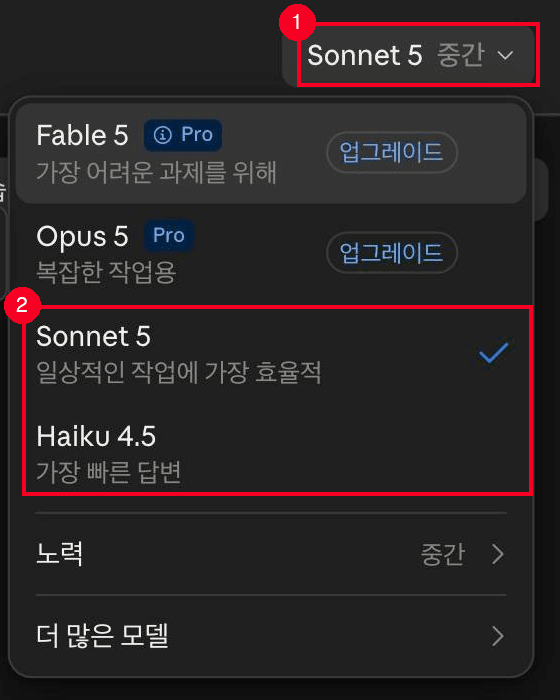
① Click the model name on the right side of the input box to open the list. ② Free accounts can use Sonnet 5 and Haiku 4.5, while Fable 5 and Opus 5 show an upgrade badge.
ChatGPT: the model picker is paid-only
ChatGPT's "model picker" is a menu for paid plans such as Plus, Pro, and Business as of August 2026. Paid users can choose the model and reasoning level from this menu. The switch for automatic reasoning is under Settings > General, labeled "Higher intelligence."
Free accounts do not show the model picker. The only control you can change is the Think button in the input box, while the model stays fixed at the default, GPT-5.6 Luna.
Gemini: click the model name in the input box
Gemini displays the current model name inside the text input box at the bottom of the screen. Click it to open the list, and free accounts can choose Flash-Lite, Flash, or Pro. You must be signed in to switch models.
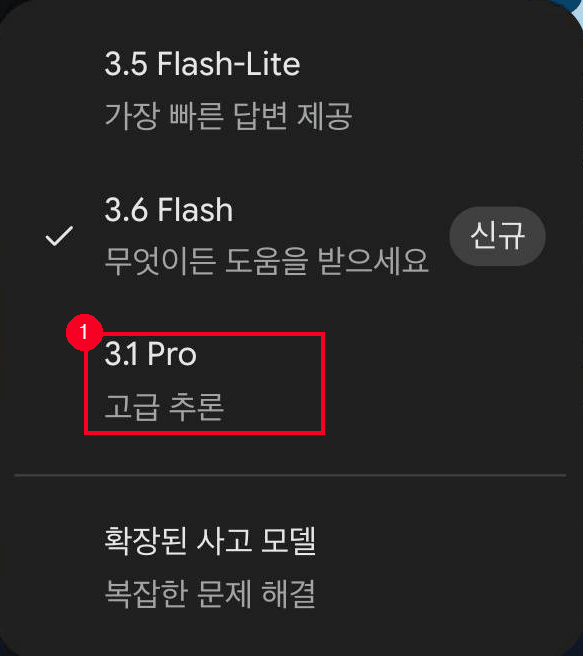
Clicking the model name (Flash) on the right side of the input box opens this list. ① Even on a free account, the advanced reasoning model 3.1 Pro appears in the list.
When your free limit refreshes
If you keep using a free plan, you will eventually see a notice saying that you have reached a limit. Each service clears its limits differently, so check both the notice and the reset time.
- ChatGPT: Plain-text chat is unlimited, so you will mainly hit limits on tools such as image generation or file uploads. When you reach a limit, the screen shows when you can use the tool again.
- Claude: The basic limit is a 5-hour session, and paid plans add a weekly limit. The session limit clears after enough time passes.
- Gemini: Limits refresh every 5 hours, and a separate weekly limit also applies. Paid subscribers can continue a conversation with Flash-Lite after hitting a limit, but free accounts do not get this fallback.
Claude says in its official documentation that reusing material already added to a project does not consume your usage limit. If you keep pasting the same reference material into chats, adding it to a project can save your limit.
Consider paying: limits, long docs, top models
Free is enough for a few questions a day, polishing short writing, learning about a concept, or doing a simple translation. If you rarely hit a limit, there is little reason to pay. Gemini is especially generous because it opens the Pro model to free users, and image generation is included too.
Consider paying when you see a limit notice two or three times a week, need to work through long documents in one go, or repeatedly need a top-tier model for complex analysis or code.
Here are the prices as of August 2026. ChatGPT Go is $8/month and Plus is $20/month. Claude Pro is $17/month with annual billing and $20/month with monthly billing. Google AI Plus is ₩7,500/month, and Google AI Pro is ₩29,000/month.
Which plan to choose for which signal is covered in the pricing lesson.
Models are not the only setting that changes how an answer feels. One switch makes the same model take longer to think. The thinking modes lesson covers that setting.
- ChatGPT, Claude, and Gemini are all usable for free. What differs is which model you get and the usage limits
- ChatGPT Free now has unlimited plain-text chat, while the exact numbers for other limits remain undisclosed across all three companies. Any "X messages a day" figure you see elsewhere is not official
- Switching models: on Gemini and Claude, free accounts can click the model name next to the input box. ChatGPT's model picker is paid-only, and free users can only change the Think button
- Gemini is the only one that opens its top-tier model (Pro) to free users. ChatGPT and Claude reserve their top-tier models for paid plans
- Once you start hitting limits regularly, that is the time to consider paying
Frequently asked questions
What is ChatGPT's free daily message limit?
As of August 2026, OpenAI says plain-text chat can be used without a message limit. Anti-abuse safeguards still apply. Image generation, file uploads, voice, and other tools have separate limits, but the exact numbers are not published. When you reach a tool limit, the screen shows a notice and the reset time.
I reached a limit. When does it reset?
ChatGPT shows a reset time on screen when you reach a tool limit. Claude Free refreshes on a 5-hour session basis, and Gemini combines a 5-hour refresh with a separate weekly limit. All three become available again after you wait for the relevant limit to clear.
Why cannot I see the top-tier model on my free account?
ChatGPT's GPT-5.6 Sol and Claude's Fable and Opus are paid-plan exclusives, so they do not appear in the model list for free accounts. Gemini is the exception: free accounts can select the Pro model.
Does switching models erase my previous conversation?
No. The conversation stays intact. Gemini only requires you to be signed in when you switch between models.
Do free plans show ads?
OpenAI's official documentation says that ChatGPT's free tier may show ads in some countries. Claude and Gemini do not have official documentation stating that their free tiers show ads.
Sources (9)Expand to see all sources
- OpenAI Help Center, "GPT-5.6 in ChatGPT": free default model transition, how limits work, model picker is paid-plan-only (rechecked 2026-08-24)
- OpenAI Help Center, "ChatGPT Free Tier FAQ": scope of free features, ads, what resets on upgrade (checked 2026-08-20)
- ChatGPT Pricing page: per-plan pricing and context window (checked 2026-08-20)
- Claude Pricing page: per-plan model availability table and pricing (checked 2026-08-20)
- Claude Help Center, "Change the model, effort, and thinking settings": model selector location (checked 2026-08-20)
- Claude Help Center, "Usage limit best practices": session and weekly limit structure, project caching savings (checked 2026-08-20)
- Google Gemini Help, "Gemini Apps usage limits and models by plan" (checked 2026-08-20)
- Google Gemini Help, "Manage your Google AI plan from Gemini Apps": sign-in requirement for model switching and model dropdown (checked 2026-08-20)
- Google AI Plans overview: Plus/Pro/Ultra pricing (checked 2026-08-09)