How to Turn On ChatGPT Reasoning, Claude Extended Thinking, and Gemini Thinking Levels
AI services let you adjust not only which model answers, but also how it works toward an answer. In this lesson, I use thinking mode as a general name for a setting that makes the AI spend more time reviewing a problem before responding. ChatGPT, Claude, and Gemini each offer this setting under a different name.
Have you ever asked for a difficult calculation or a task with several conditions and received an unreliable answer? Or asked something simple and waited longer than expected? When an unfamiliar setting appears on the screen, it is easy to leave it alone without knowing what it changes.
The previous lesson was about choosing a model. This lesson is about changing how that same model answers. We will give ChatGPT and Claude equal attention by checking their setting names and locations, then briefly compare Gemini later. You will also learn when to turn the setting on or off and compare the difference with the same question. Names and locations change often, so check each company's official documentation if you are reading this much later.
- Thinking Mode (Reasoning / Extended Thinking)
A setting that makes the AI spend more time breaking down a problem, planning its approach, and considering multiple ways to solve it before answering. It does not switch to a different model. It gives the same model more "thinking time," which also means slower responses and heavier usage.
Thinking mode: another switch besides the model
The previous lesson compared choosing a model to choosing a chef. Thinking mode does not replace the chef. It is closer to telling the same chef, "Take your time and do it properly." The chef gets more time to inspect the ingredients, but the meal arrives later.
Many people do not know this setting exists. All three services default to a fast answer, so the AI keeps answering quickly unless you change something. That can make a difficult answer feel disappointing without making it clear which setting to adjust.
Thinking settings: names and locations (August 2026)
| ChatGPT | Claude | Gemini | |
|---|---|---|---|
| Name | Reasoning level | Extended thinking + effort level | Thinking level |
| Where to turn it on | Reasoning slider in the model picker | Click the model name next to the send button → Effort/Thinking | Location not specified in the official docs (check around the model menu) |
| Free plan | "Think" button available (uses the free default model) | Included (effort level and extended thinking adjustable on Sonnet) | Docs say "adjustable where available" (varies by account) |
| Top tier | Pro level (Pro/Business/Enterprise plans, GPT-5.6 Sol Pro) | Max effort level | Deep Think (Ultra subscription only) |
Now let us look at where each setting appears in the service itself.
ChatGPT: reasoning slider and Think button
On paid plans, the reasoning slider is rolling out gradually in the model picker. OpenAI's official documentation describes it as a rollout to eligible paid plans, so it may not appear on every account yet. The levels are Instant (fast answers) → Medium → High → Extra High → Pro. The available range depends on your plan: Plus goes up to Medium/High, while the Pro plan unlocks Extra High and Pro.
Free and Go plans do not have this slider. They offer a "Think" button for difficult questions instead. Think uses the free default model, GPT-5.6 Luna, rather than the higher model, GPT-5.6 Sol.
ChatGPT can also switch automatically. Even when you select Instant, paid plans may use more reasoning for a complex question. To turn this off, go to Settings → General → Higher intelligence.
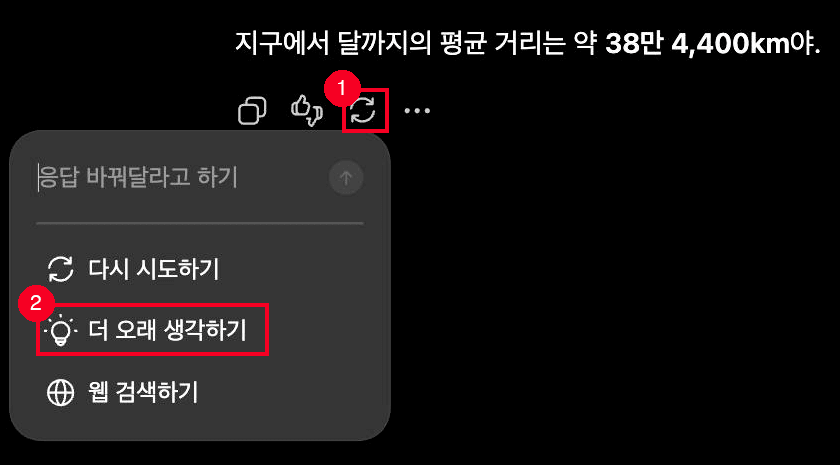
This is the free-account view. ① Click the regenerate icon below a response. ② Choose the option to think longer. Paid plans choose the reasoning level directly in the model picker.
Claude: effort level and extended thinking
Claude has two settings, which can be confusing at first. The official documentation separates them like this:
- Effort level: how much effort Claude puts into every response. The levels run Low → Medium → High → Extra High → Max.
- Extended thinking toggle: whether Claude works through the problem in a separate "Thinking" section before answering.
These settings are independent, so you can use any combination of them. Both are in the same place: click the model name next to the send button, hover over Effort, and choose a level or turn on the Thinking toggle.
Extended thinking is included in the free plan. The pricing page lists it under the free tier, and effort level selection is also available on Sonnet, the model included for free users. As of August 2026, the top-tier model Opus 5 cannot turn extended thinking off. It always thinks before answering.
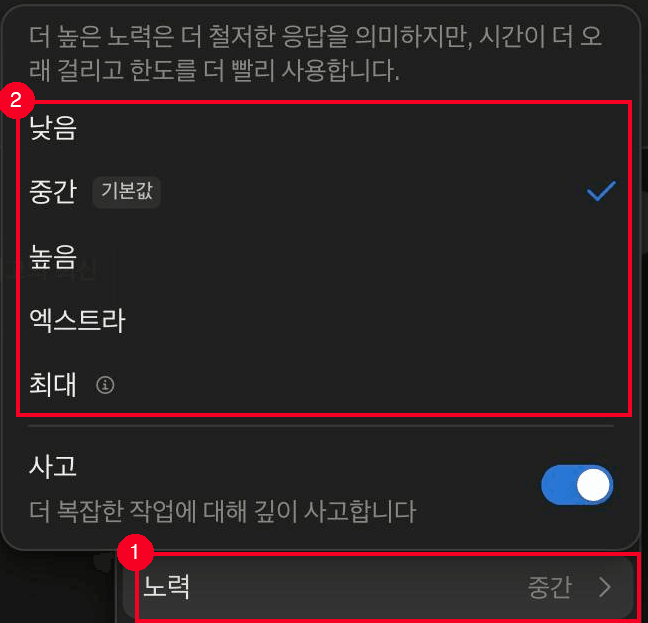
① Hover over the Effort row in the model menu. ② The levels expand from Low to Max. Turn on the Thinking toggle below when you want Claude to think more deeply about a complex task.
Gemini: three thinking levels
Gemini has three thinking levels:
- Standard thinking: the default. It is suitable for most questions and gives faster answers.
- Extended thinking: for complex problems. It reasons longer before answering.
- Deep Think: the top tier, available only with an Ultra subscription. It uses parallel reasoning and can take several minutes to answer. It works only when the Pro model is selected.
The official documentation only says that a free account can adjust the thinking level "where available." The options you see can therefore depend on your account and model. If the setting is missing, nothing is broken. Switch to the Pro model and check again.
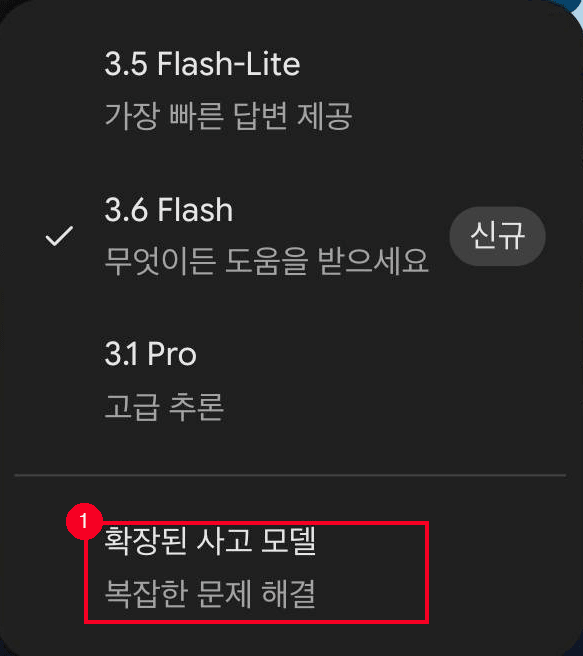
Click the model name in the input box to open the model list. ① The extended thinking model for complex problem-solving appears in the list. This is the free-account view.
Turn thinking on for hard work, off for simple tasks
Thinking mode is not automatically better when it is turned on. It takes longer and uses more of your quota. Claude's official documentation says that higher effort uses more tokens and makes you reach the limit faster. Gemini also says that higher thinking levels consume more usage, and the same trade-off matters when you use ChatGPT or Claude.
Turn it on for tasks such as mathematical calculations and proofs, difficult coding, project planning, careful document analysis, and multi-step problems. These tasks are easy to get wrong when the middle steps are skipped. Examples include building a schedule with three conditions that must all fit or finding conflicting clauses in a contract.
Leave it off for short questions, basic explanations, sentence polishing, and simple translation or summarization. Thinking longer does not make these answers better. It only costs you waiting time and quota, which matters even more on a free plan with a smaller limit.
I usually leave the default setting alone and raise the reasoning level only when getting the answer wrong would cause trouble. Keeping it on all the time is wasteful.
Compare thinking on and off with one question
Start by comparing the same question in ChatGPT and Claude with thinking off and then on. You can ask the same question once more in Gemini at the end if you want to compare all three services.
Thinking issues: speed, options, auto-switching, limits
If an answer stays on "Thinking" for a long time, it is not necessarily broken. The thinking mode may simply be running. Gemini's Deep Think can take several minutes, as the official documentation warns. Claude shows a timer while it thinks. Once the answer appears, expand the "Thinking" section above it to review the reasoning.
If a reasoning option is missing, your plan may be the reason. ChatGPT's Free and Go plans provide only the Think button, while the higher reasoning levels are paid-only. Gemini's Deep Think requires an Ultra subscription and the Pro model. An administrator may also have disabled the option on an Enterprise account.
If ChatGPT starts thinking longer without asking, automatic switching is probably enabled. On paid plans, a complex question can trigger more reasoning even when Instant is selected. For faster answers, turn off Higher intelligence under Settings → General.
It is also normal to hit a limit quickly after turning reasoning on. More thinking means more usage. ChatGPT has a separate limit for manually selected reasoning, and it may continue with another available reasoning model after you reach that limit. Turning it on only for tasks that need it helps preserve your quota on both free and paid plans.
- All three services offer a setting that makes the same model think longer: ChatGPT's reasoning level, Claude's extended thinking and effort level, and Gemini's thinking level
- Turning it on can improve math, analysis, and multi-step work, but it slows the response and uses more quota. It is wasteful for short questions
- Claude includes extended thinking on the free plan, and ChatGPT's free plan provides the Think button (as of August 2026)
- The top tiers have a separate gate: ChatGPT's Pro plan and Gemini's Deep Think, which is Ultra-only
- The default is always a fast answer. Turn the setting up only for work where being wrong would cause trouble
Frequently asked questions
What changes when you turn on reasoning mode?
The AI spends more time breaking down the problem and reviewing its approach before answering. Accuracy improves on math, analysis, and multi-step problems, but responses take longer and use more quota.
Can you use reasoning mode on a free plan?
Claude includes extended thinking on its free plan. ChatGPT's free and Go plans provide a Think button for difficult questions, and it runs on the free default model, GPT-5.6 Luna. Gemini's visible thinking-level options vary by account.
What is Deep Think?
It is Gemini's top thinking level. It uses parallel reasoning for the deepest analysis, but can take several minutes to answer. It is exclusive to Google AI Ultra subscribers and works only when the Pro model is selected.
What's the difference between reasoning mode and switching models?
Switching models replaces the brain doing the answering. Reasoning mode gives that same brain more time to think. They are separate settings, so you can adjust both together.
How far does ChatGPT's reasoning level go on each plan?
As of August 2026, Plus unlocks up to Medium/High, while Pro, Business, and Enterprise unlock Extra High and Pro. Free and Go plans provide the Think button, which uses GPT-5.6 Luna, instead of the reasoning slider.
Sources (4)Expand to see all sources
- OpenAI Help Center, "GPT-5.6 in ChatGPT": reasoning slider levels, plan availability table, Think button, auto-switching, limits (checked 2026-08-21)
- Claude Help Center, "Change the model, effort, and thinking settings": effort level tiers, extended thinking toggle location, recommended use cases (checked 2026-08-21)
- Claude pricing page: confirms extended thinking is included on the free plan (checked 2026-08-21)
- Google Gemini App Help Center, "Gemini App Limits and Upgrades for Google AI Subscribers": three thinking levels, Deep Think requirements, usage consumption (checked 2026-08-21)